This website uses cookies. By clicking Accept, you consent to the use of cookies. Click Here to learn more about how we use cookies.
Community FAQ
Register | Log In
Turn on suggestions
Auto-suggest helps you quickly narrow down your search results by suggesting possible matches as you type.
Turn on suggestions
Auto-suggest helps you quickly narrow down your search results by suggesting possible matches as you type.
- Lansweeper Community
- Forums
- Flow Builder
- Forum
- Branch Logic Question
Options
- Subscribe to RSS Feed
- Mark Topic as New
- Mark Topic as Read
- Float this Topic for Current User
- Bookmark
- Subscribe
- Mute
- Printer Friendly Page
Register to ask a question, start a topic or share an idea
Join the Community

Options
- Mark as New
- Bookmark
- Subscribe
- Mute
- Subscribe to RSS Feed
- Permalink
- Report Inappropriate Content
09-23-2025 08:09 PM
This should be an easy one....
I have a CSV of IP's that I am looping through to do an Asset Lookup. If the Asset is found, I want to edit the asset. If the asset was not found, I want to skip to the next item. What is the branch logic for 'exists'?

Is there a way to do an If TRUE, Then Update based on the Asset Lookup?
2 REPLIES 2


Options
- Mark as New
- Bookmark
- Subscribe
- Mute
- Subscribe to RSS Feed
- Permalink
- Report Inappropriate Content
09-24-2025 11:40 AM - edited 09-24-2025 11:40 AM
By filtering the List of Assets action using the current IP item in the loop, you can avoid the second Loop and the branch action. If you want to reference a previous step in your filter, remember to change the Filters field to "Template" (the grey icon at the left of the field) and click on the + icon to add your reference.
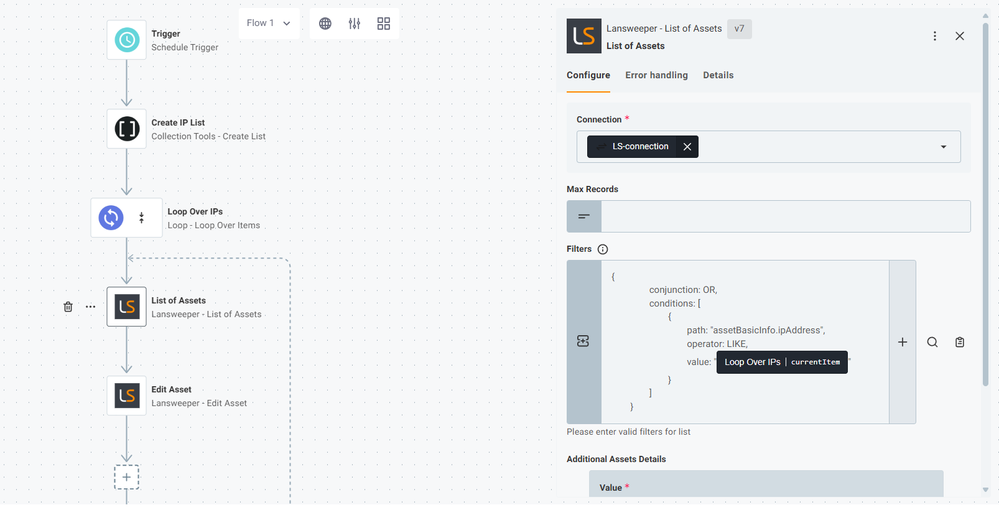
This workflow does not consider duplicates. So if you have 2 assets with the same IP, only the first one will be edited. If you want to edit all the assets with the same IP, then you still need to add a second Loop, but in this case, it won't loop over all the List of assets, only the assets with that IP.
In the upcoming release, we’re introducing a new action called "Match Assets". This action lets you quickly match a list of external assets against your Lansweeper assets and instantly see which ones match or don’t. This makes the process even simpler than before. Stay tuned!


Options
- Mark as New
- Bookmark
- Subscribe
- Mute
- Subscribe to RSS Feed
- Permalink
- Report Inappropriate Content
09-24-2025 09:48 AM - edited 09-24-2025 09:49 AM
You might need two loops. The first loop will go through your CSV. Once that loop starts and selects the first IP address, the logic will then need to fetch the list of assets, and loop through all of those so it can check whether that IP address from the CSV is also in an asset.
A possible issue that you might encounter though is that this flow might take a long time, depending on how many assets and IPs you have in your CSV. Since for every IP it will go through every single asset to try and get a match.
@Vicente_SC this might be an example of where the 15min execution limit is an issue


Forum
New to Lansweeper?
Try Lansweeper For Free
Experience Lansweeper with your own data. Sign up now for a 14-day free trial.
Try Now