This website uses cookies. By clicking Accept, you consent to the use of cookies. Click Here to learn more about how we use cookies.
Turn on suggestions
Auto-suggest helps you quickly narrow down your search results by suggesting possible matches as you type.
- Lansweeper Community
- Forums
- Technical Support Solutions
- Database Permission Errors for Lansweeper Auto-Upd...
Options
- Subscribe to RSS Feed
- Bookmark
- Subscribe
- Printer Friendly Page
- Report Inappropriate Content

apiknowbler
Scout Sweeper
Options
- Article History
- Subscribe to RSS Feed
- Bookmark
- Subscribe
- Printer Friendly Page
- Report Inappropriate Content
on 10-07-2025 12:00 PM
Summary
Description
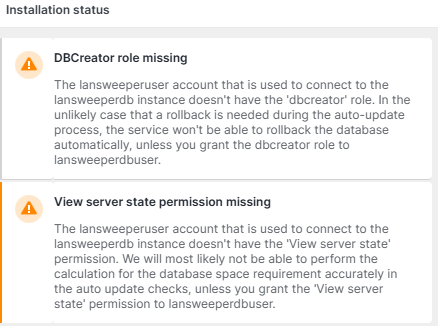
The issue involves database permission errors with Lansweeper's new auto-update feature. This feature requires specific permissions for the Lansweeperuser account on the SQL instance. Error messages indicate insufficient permissions during auto-update attempts.
Information
The database permission errors relate to Lansweeper's auto-update. The Lansweeperuser account on the SQL instance needs two permissions:
- dbcreator role: Allows Lansweeper to create a database backup, providing a restore point if the auto-update needs to roll back.
- view server state permission: Allows Lansweeper to monitor database and backup storage usage.
Solution
The following KB article includes an SQL statement granting the required role and permission to the lansweeperuser account: Enable the Lansweeper scan server to auto-update - Lansweeper Community - 79957
You can also assign permissions manually in SQL Server Management Studio (SSMS):
- Open SSMS and connect to the SQL instance hosting the Lansweeper database.
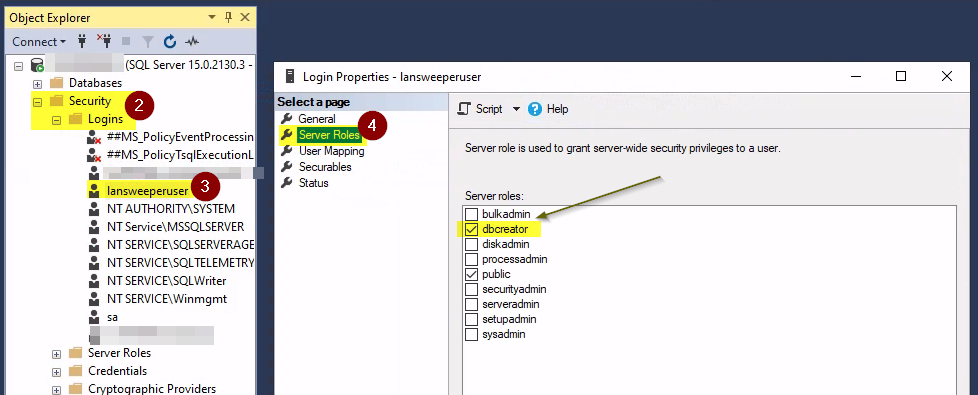
- Go to Security > Logins and find lansweeperuser.
- Right-click the account and select Properties.
- Under Server Roles, check dbcreator.
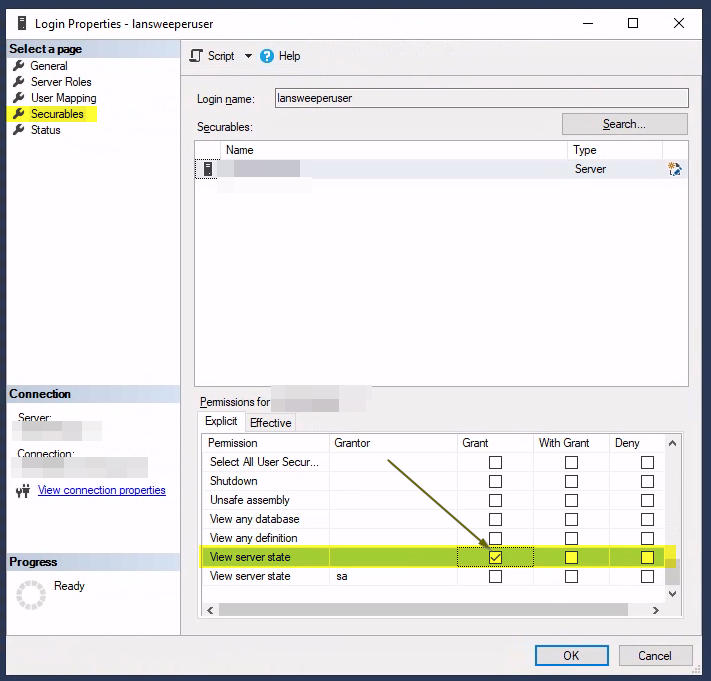
- Under Securables, locate 'View server state' and tick 'Grant'.
- Afterward, it is recommended to restart the following services:
- IIS Express (or World Wide Web Publishing Service)
- Lansweeper Server service.
After these changes, permission errors should no longer appear in the Lansweeper web console.
100% helpful
(1/1)
New to Lansweeper?
Try Lansweeper For Free
Experience Lansweeper with your own data. Sign up now for a 14-day free trial.
Try Now