When deleting an inactive helpdesk agent, you might get the following error:
ERROR: Transfer this agent's data to a different agent first.
To transfer data from one user to another:
- Go to Configuration > User Access & Roles in your Lansweeper web console.
- Locate the agent’s account that you want to transfer the data to under Users.
- Hit the first transfer button next to the user you want to transfer tickets to. The first transfer button is for assigned tickets, and the second transfer button is for created tickets.
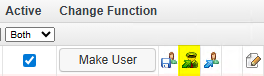
- In the pop-up, select the user you want to transfer the tickets from and hit Ok.
Ordinarily, following the procedure outlined above should ensure that any tickets assigned to the agent are transferred to someone else, but you might want to double-check the following if you continue to get the error:
- Are you absolutely certain that you used the first transfer button to transfer the agent data and not the one next to it? The second transfer button will only transfer tickets that the agent created, not tickets assigned to the agent.
- It is possible that the warning message is not referring to assigned tickets, but rather to assigned ticket types. If an agent is the default agent for a ticket type under Configuration> Ticket Content, you may also encounter this error.
Select Top 1000000 htblticket.ticketid As ID,
  htblticket.subject As Subject,
  htblusers.name As Agent
From htblticket
  Inner Join htblagents On htblagents.agentid = htblticket.agentid
  Inner Join htblusers On htblusers.userid = htblagents.userid
Where htblusers.name = 'Old Agent'


