This website uses cookies. By clicking Accept, you consent to the use of cookies. Click Here to learn more about how we use cookies.
Community FAQ
Register | Log In
Turn on suggestions
Auto-suggest helps you quickly narrow down your search results by suggesting possible matches as you type.
Turn on suggestions
Auto-suggest helps you quickly narrow down your search results by suggesting possible matches as you type.
- Lansweeper Community
- Forums
- General Discussions
- Re: Bug with Ticket SLA calculation
Options
- Subscribe to RSS Feed
- Mark Topic as New
- Mark Topic as Read
- Float this Topic for Current User
- Bookmark
- Subscribe
- Mute
- Printer Friendly Page
Register to ask a question, start a topic or share an idea
Join the Community

Options
- Mark as New
- Bookmark
- Subscribe
- Mute
- Subscribe to RSS Feed
- Permalink
- Report Inappropriate Content
Tuesday
Trying to understand if I'm encountering a bug with how SLAs are calculated or I'm just misunderstanding their implementation. LanSweeper WebSite Version: 12.6.0.12
We have an SLA defined using business hours as follows:
- Initial response: 4 hours
- Resolve time: 5 days
Our business hours are defined as MON-FRI 08:00-17:00 with SAT/SUN as "Not a workday".
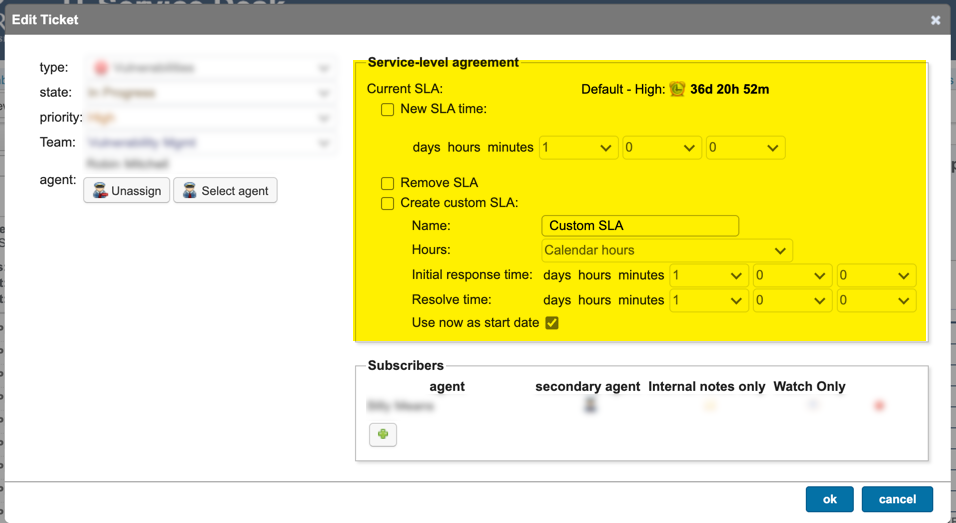
When a new ticket is created that matches the SLA type/priority/source,etc the Initial Response SLA is set to 2d 0h 0m. When the initial response is done the Resolve time SLA is set to 36d 20h 59m.
Any ideas how these are calculated?
I'm thinking we have a bug or some other error because editing the Service Level Agreement on the ticket has no effect. No combination of the available options does anything, ticket details remain the same.
Labels:
- Labels:
-
Help Desk
1 REPLY 1


Options
- Mark as New
- Bookmark
- Subscribe
- Mute
- Subscribe to RSS Feed
- Permalink
- Report Inappropriate Content
yesterday
Hi,
- Initial response time counts down until an agent posts the first public reply (with a special rule if the ticket was created by an agent: it needs a different agent’s public reply to stop the timer).
- Resolve time starts after the initial response timer stops and runs until the ticket is set to Closed.
- The SLA can run in calendar hours or business hours:
- Example given: if business hours are Mon–Fri 8 AM–6 PM and initial response is 3 hours, a ticket created at 5 PM Monday is due 10 AM Tuesday when using business hours.
- Importantly, SLAs only run during workdays, even if you pick calendar hours (weekends are excluded as workdays in the business-hours/workdays configuration).
- If multiple SLAs match a ticket, the first SLA in the list is applied (order matters).
- Go to Configuration > General Settings.
- In Business hours, verify your opening hours (Mon–Fri 08:00–17:00, Sat/Sun not workdays).
- Go to the Service-level agreement section:
- Confirm the SLA’s Hours setting is set to business hours (not calendar hours), if that’s what you intend.
- Confirm the SLA targets/criteria (type/priority/source/user/etc.).
- If you have multiple SLAs, verify the order of SLAs, because the first matching SLA is applied (reorder using the arrows if needed).
More information can be found in the following KB article: https://community.lansweeper.com/t5/configuring-using-the-helpdesk/configure-service-level-agreement...
If this does not help you resolve the issue, you can create a support case using the support portal and we can take a closer look at it.
https://community.lansweeper.com/t5/support-portal/ct-p/support-portal

General Discussions
Find answers to technical questions about Lansweeper.
New to Lansweeper?
Try Lansweeper For Free
Experience Lansweeper with your own data. Sign up now for a 14-day free trial.
Try Now
Related Content
- Bug with Ticket SLA calculation in General Discussions
- Is it possible to integrate Lansweeper with ServiceNow via API? in Technical Support Solutions
- Helpdesk Outgoing E-Mail Templates Sent to User also sends mail to Agent in General Discussions
- Knowledge Base Search Returns No Results and Images Are Broken After Server Migration in Technical Support Solutions
- Reporting Worked Time per Ticket in Technical Support Solutions
