This website uses cookies. By clicking Accept, you consent to the use of cookies. Click Here to learn more about how we use cookies.
Community FAQ
Register | Log In
Turn on suggestions
Auto-suggest helps you quickly narrow down your search results by suggesting possible matches as you type.
Turn on suggestions
Auto-suggest helps you quickly narrow down your search results by suggesting possible matches as you type.
- Lansweeper Community
- Forums
- General Discussions
- Re: Has Anyone Setup a new HP Warranty API Key?
Options
- Subscribe to RSS Feed
- Mark Topic as New
- Mark Topic as Read
- Float this Topic for Current User
- Bookmark
- Subscribe
- Mute
- Printer Friendly Page
Register to ask a question, start a topic or share an idea
Join the Community

Options
- Mark as New
- Bookmark
- Subscribe
- Mute
- Subscribe to RSS Feed
- Permalink
- Report Inappropriate Content
07-08-2025 02:31 PM
I was excited to see that HP Warranty scanning is available again in the new 2.5.2.3 update right up until I tried figuring out how to get one of these API keys.
I've seen the updated documentation and sadly this doesn't seem to correspond to anything on HP's dev website:
https://community.lansweeper.com/t5/sites/enable-warranty-tracking/ta-p/70334#HP
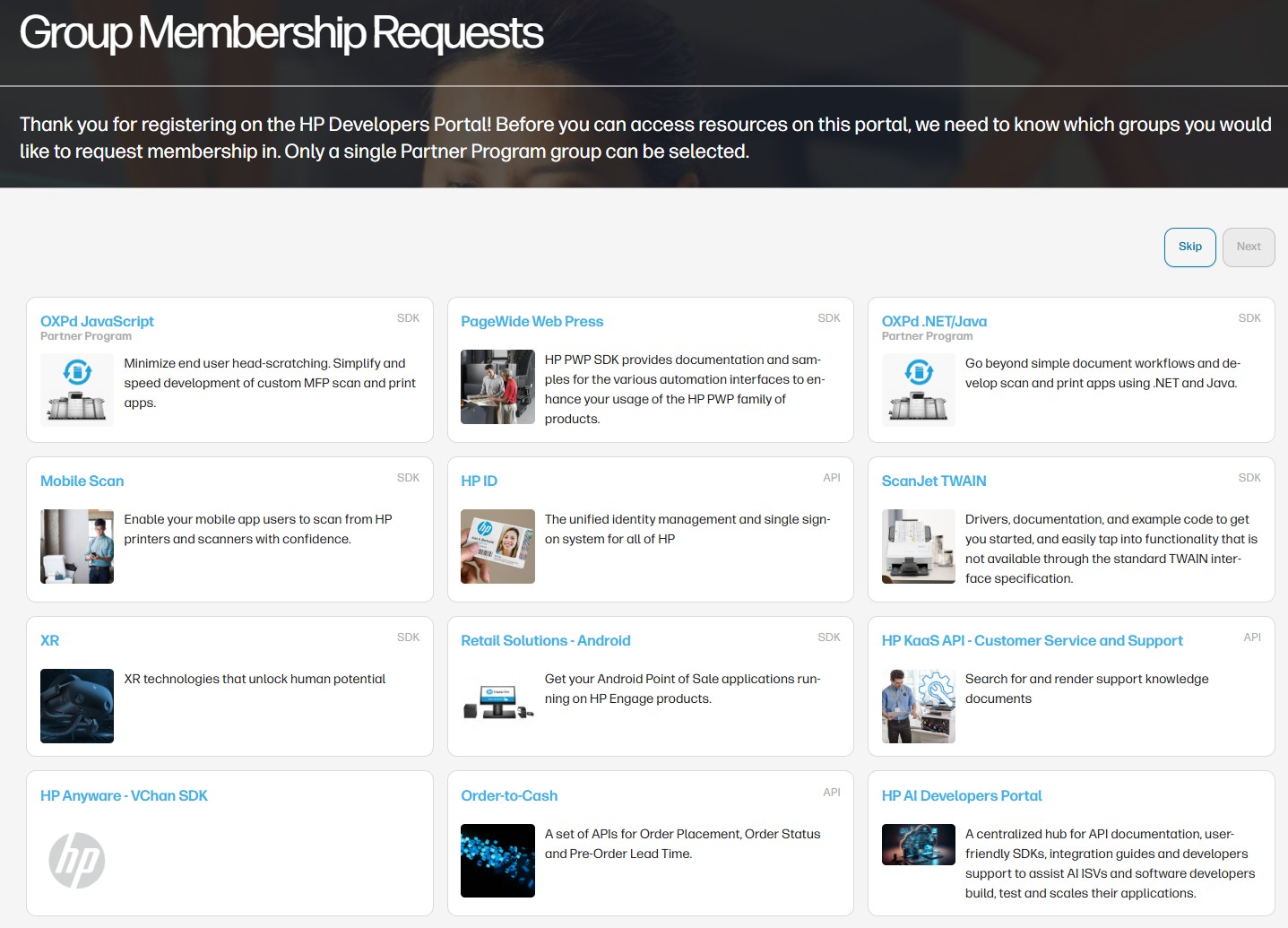
None of the groups listed on HP's site indicates it will provide access to the Warranty API so if you skip the initial group selection page you can then see some more options including HP Client Management (which does mention Warranty tracking), but this then goes to a placeholder page with no further info. The other possible option is HP Proactive Insights but this then requires another login which indicates you need to be a paying customer to access anything further.
Am I being blind here and missing something obvious or have HP management to create yet another abomination of a website that is impossible to navigate?
It would also be great if the lansweeper docs could get updated a bit to reflect this and hopefully provide some updated guidance.
Labels:
- Labels:
-
Scanning
19 REPLIES 19

Options
- Mark as New
- Bookmark
- Subscribe
- Mute
- Subscribe to RSS Feed
- Permalink
- Report Inappropriate Content
01-14-2026 07:36 PM


Options
- Mark as New
- Bookmark
- Subscribe
- Mute
- Subscribe to RSS Feed
- Permalink
- Report Inappropriate Content
01-15-2026 09:51 AM
- Register on HP developers portal: https://developers.hp.com
- Receive mail with process
- Thank you for your continued participation Now that you have registered as a user on the HP Developers Portal, please follow the additional steps listed below to continue with the HP Warranty API :
- Login to the HP Developers Portal (if you are not already logged in)
- Navigate to the instructional HP Warranty API page or https://developers.hp.com/hp-warranty-api
- Follow the ‘Enrollment Process’ steps which include completing and submitting the Enrollment Form and agreeing to the Warranty API EULA.
- Send an email to warrantyapi.customers@hp.com with any questions you have about the enrollment process.
- Once enrolled, go to https://developers.hp.com/hp-warranty-api and create your API key and secret
Options
- Mark as New
- Bookmark
- Subscribe
- Mute
- Subscribe to RSS Feed
- Permalink
- Report Inappropriate Content
01-15-2026 11:20 AM
That is not entirely the correct process and your documentation and advise needs to make it clear to people that you need to have a HP account manager, or a means to get access to an account manager, and it is the HP account manager that needs to provide you access to the API page once you have done the developer enrolment - see the post from @RobertRosell
Options
- Mark as New
- Bookmark
- Subscribe
- Mute
- Subscribe to RSS Feed
- Permalink
- Report Inappropriate Content
07-17-2025 04:54 PM
Not available. In all the groups available to join none are HP Warranty API. And when clicking on the link you provided I just get an Access denied.

Options
- Mark as New
- Bookmark
- Subscribe
- Mute
- Subscribe to RSS Feed
- Permalink
- Report Inappropriate Content
07-22-2025 04:59 PM - edited 07-22-2025 05:01 PM
We updated Enable warranty tracking - Lansweeper Community with the last info we received from HP. Can you retry using those instructions? If that still doesn't work, can you contact warrantyapi.customers@hp.com to gain access to the HP warranty API with your HP developers account?
Contact via mail is part of the process regardless:
Thank you for contacting HP Warranty API Operations Team and for your interest in interlocking with the HP Warranty API Tool. We invite you to complete the enrolment process to ensure a smooth onboarding experience onto the HP Warranty API Tool.
Please follow the steps mentioned below. Should you have any questions or need clarifications, please contact us at warrantyapi.customers@hp.com.
Step 1: Register on the HP Developers Portal (if you are not already registered) with your company/business email address (NOT your personal email address).
Step 2: Send a reply email to warrantyapi.customers@hp.com confirming your registered email id. Copy (cc:) your HP Account Manager/HP Contact in this reply email.
Step 3: Await a follow-up reply email from warrantyapi.customers@hp.com with further instructions.
We look forward to working with you closely on the HP Warranty API over the next 2-3 weeks during which we will evaluate your use of Warranty API. In the end, we will look forward to receiving your feedback on the process to gain access to Warranty API as well as its usage.
Options
- Mark as New
- Bookmark
- Subscribe
- Mute
- Subscribe to RSS Feed
- Permalink
- Report Inappropriate Content
07-22-2025 05:05 PM
Thanks.
I had reached out via email already as I was getting nowhere. They replied back asking for our HP account managers email address. The problem is we don't have a HP account manager, we just purchase HP products via a reseller, we don't liaise directly with HP.
Options
- Mark as New
- Bookmark
- Subscribe
- Mute
- Subscribe to RSS Feed
- Permalink
- Report Inappropriate Content
07-22-2025 05:10 PM
Can you then ask for the reseller to contact HP directly (and get hold of HP warranty API key for you) ?
Options
- Mark as New
- Bookmark
- Subscribe
- Mute
- Subscribe to RSS Feed
- Permalink
- Report Inappropriate Content
07-11-2025 02:55 PM
@Nick-C , here's the official HP documentation. We're already planning on extending our own documentation with this one:
- Register on HP developers portal: https://developers.hp.com
- Receive mail with process
- Thank you for your continued participation Now that you have registered as a user on the HP Developers Portal, please follow the additional steps listed below to continue with the HP Warranty API :
- Login to the HP Developers Portal (if you are not already logged in)
- Navigate to the instructional HP Warranty API page
- Follow the ‘Enrollment Process’ steps which include completing and submitting the Enrollment Form and agreeing to the Warranty API EULA.
- Send an email to warrantyapi.customers@hp.com with any questions you have about the enrollment process.
- Once enrolled, go to https://developers.hp.com/hp-warranty-api and create your API key and secret
Options
- Mark as New
- Bookmark
- Subscribe
- Mute
- Subscribe to RSS Feed
- Permalink
- Report Inappropriate Content
07-16-2025 11:36 AM
@Gilian Thanks for this, it looks like that includes a couple of steps that were missing from the lansweeper docs.
Although now it looks like it's just HP's terrible website that is causing problems as HP Warranty API page is giving me "too many redirect" errors even in different browsers.
At least this is some progress though and will hopefully work if/when HP fix their website!
Options
- Mark as New
- Bookmark
- Subscribe
- Mute
- Subscribe to RSS Feed
- Permalink
- Report Inappropriate Content
10-24-2025 10:17 PM
I also got the Too Many Redirects message

General Discussions
Find answers to technical questions about Lansweeper.
New to Lansweeper?
Try Lansweeper For Free
Experience Lansweeper with your own data. Sign up now for a 14-day free trial.
Try Now
Related Content
- Azure scanning - Jira Assets - missing cloud properties in General Discussions
- Is it possible to integrate GCP with Lansweeper on-prem? in Technical Support Solutions
- How Many Databases Do I Have If I Use Multiple Scanning Servers? in Technical Support Solutions
- Variables in Recursive Flows in Flow Builder
- M365 Coud scanning does not Scan in General Discussions
